
Jira Lifecycle
RHEL and centos-stream kernel changes occur nearly exclusively through Jira tickets. This document outlines the lifecycle of a Jira ticket for a centos-stream kernel change.
For every modification against the RHEL kernel, an approved Jira ticket (or just jira) is required for that change to make it into the release. This document provides an overview of a modification to the RHEL kernel from the perspective of the jira and how it evolves through the journey.
The status journey on a jira can be any one of the following values. Note that there are additional status settings, but they are not generally used.
It is not explicitly required that this process is followed in 100% order. Meaning, that a bugfix may be prepared ahead of the jira being ready, but the overall process cannot be completed until each of the detailed steps below are completed and satisfied.
For guidance around the overall Kernel Workflow process, please visit the Quick Start Guide.
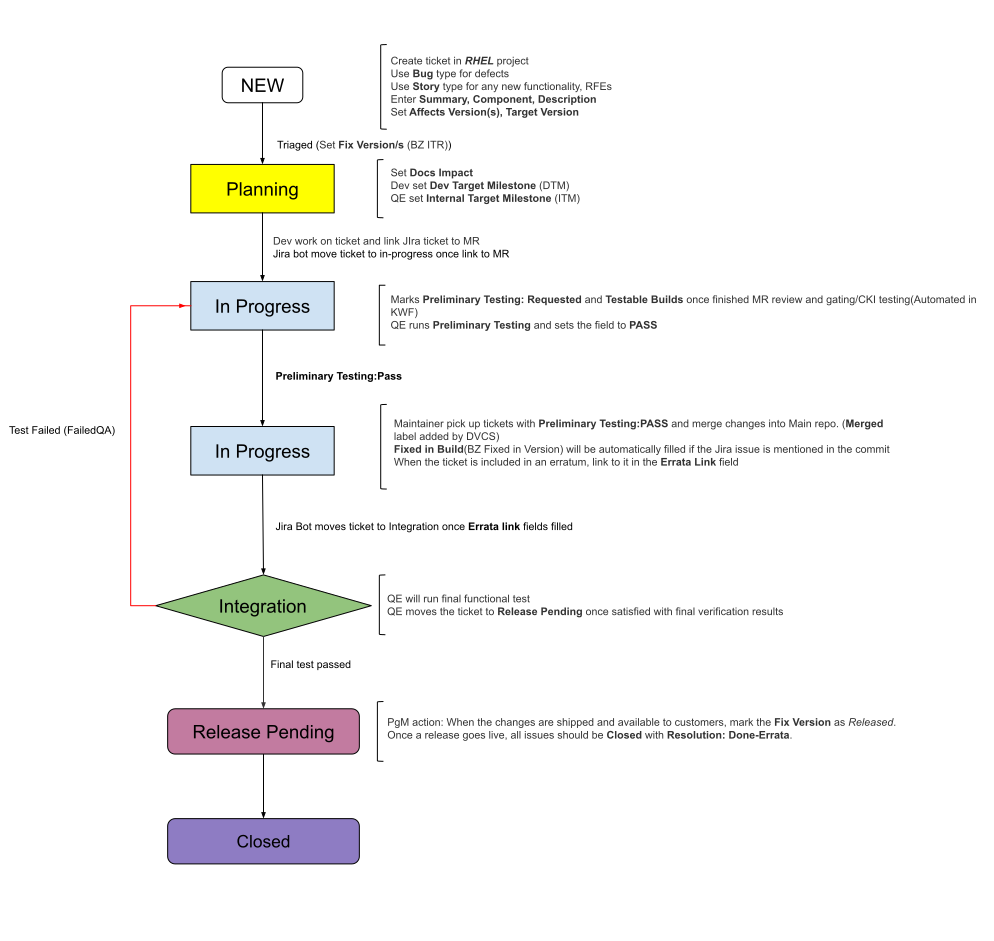
Below is a summary workflow diagram complete with all relevant details;
New
|
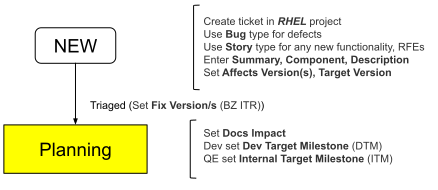
As with every process, it must begin somewhere. For Jira and the Kernel Workflow process, this status ends up being |
Transitions
-
PlanningOnce a Jira is triaged, it can move toPlanning. Triaging requires ensuring the Jira is properly filled out and in the correct team. As such, moving toPlanningindicates the ticket is fully triaged. -
ClosedA ticket can move straight to closure if, while triaging, if the ticket is a duplicate ticket, the described issue is expected behavior, the associated team can not or will not fix it for various reasons, etc.
Planning
The Planning stage is largely to ensure a jira is properly triaged and the effort required to pull an upstream change into centos-stream can occur within a specific development cycle in an SST.
|
Note
|
If the jira documents an issue that requires a change to merge upstream before it can be downstreamed into centos-stream, the work of creating and merging a change upstream is done in the Planning stage.
|
|
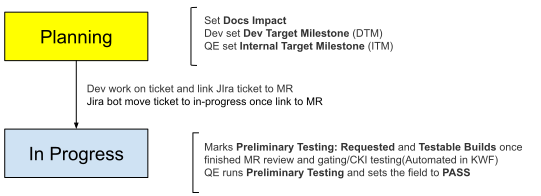
A jira in |
The definition of a jira as ready to move to In Progress (or Definition of Ready) varies between teams. Some may do nothing more than the workflow as is while others may add on flags or additional requirements. Check with your scrum master to see if there are any “definitions of ready” to be aware of on your team.
Transitions
-
In ProgressOnce a jira is appropriately scoped and assigned, the jira can move toIn Progresswhere work for moving the proposed change into centos-stream/RHEL can begin. "Work" can include research, upstream activity, patch development against the RHEL trees, etc. -
ClosedA jira may be closed out at this stage for a variety of reasons; the jira is stale, too low on the priority queue for the assigned team to get to it within a reasonable time, the code path/subsystem becoming deprecated or maintenance mode (with rare exceptions for Important or Critical CVEs), etc.
In Progress
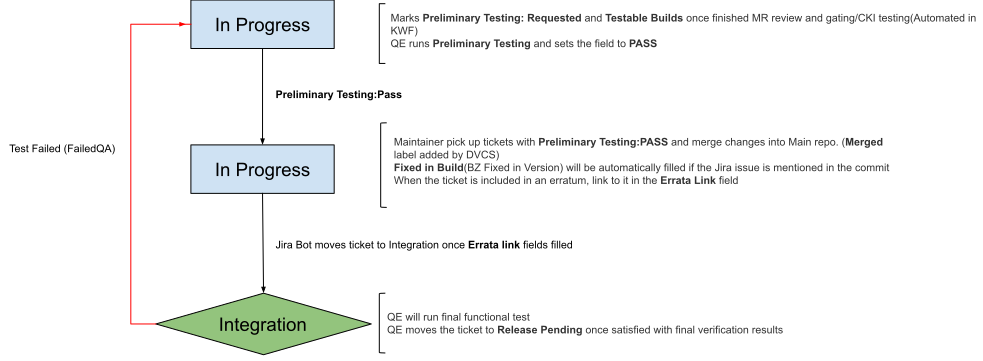
In Progress is roughly split into two "halves", one half where the work is done to address the issue in the code, and the second half where builds of the kernel with the change are lightly tested and logistics of the errata release are determined. The main dividing line between the two halves are when a merge request (MR) is posted for review or when the MR is merged into a candidate kernel build and ready for preliminary testing.
|
A jira in the first half of |
Below is an overview of all the work for a jira in In Progress;
-
When a proposed patch is ready, make sure to tag all commits constituting the Merge Request as specified in the Commit Rules document.
-
Open MR. The remainder of the steps in this overview occur in Gitlab.
-
Obtain at least three reviews where one is from the affected code owners.
-
While waiting for reviews, automations should apply tesing and CKI labels to the jira to perfom "Preliminary Testing".
-
At this point, "Preliminary Testing" may be automated via tier testing and/or manually via the assigned team. Here, the proposed change is merged and candidate kernel builds start for "Preliminary Testing." Most of these tests are sanity checks the proposed change does not break the build.
NoteFor Z-stream, "Preliminary Testing" (done by the Assigned Team) is always the primary quality gate. The integration testing step has been removed from the kmaint Z-stream pipeline. Quality Assurance Continuous Kernel (QuACK) builds are available for each Z-stream for teams that need to test potential integration interaction issues between MRs. These builds contain integrated content of MRs in readyForQAstate. -
Once "Preliminary Testing" passes, the associated jira is confirmed to be
In Progress, and the MR receives three reviews, the MR receives the "readyForMerge" label. This means the MR can be fully merged into an upcoming kernel release and the jira scheduled for inclusion in an upcoming errata.
Transitions
-
IntegrationOnce a patch’s preliminary testing successfully completes and is scheduled for inclusion in an errata, the jira can move toIntegrationfor more thorough testing.
Integration
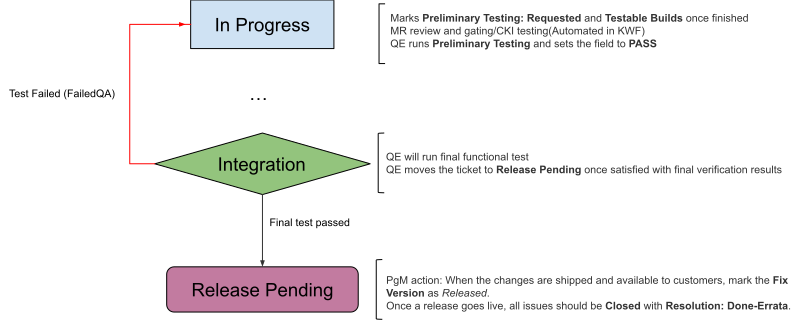
Integration is where the bulk of testing occurs. Automations should build the kernel with the MR merged for the more rigorous testing.
|
Integration testing is far more robust and comprehensive compared to Preliminary Testing and is intended to ensure the proposed change addresses the issue and catch potential regressions introduced by the change. A large number of functional tests occur like K1 and K2 tier testing. If failures occur and the failing test(s) is/are confirmed to be correctly testing, the developer will need to make any appropriate adjustments and try again. |
Transitions
-
Release PendingOnce testing finishes and QE finds the results as suitable, the jira transitions toRelease Pendingas the fix awaits release in a fully generally available (GA) release. -
In ProgressIf testing fails and QE can confirm functional testing was functionally correct and properly executed, the jira moves back toIn Progressfor the developer to make any necessary adjustments to allow the kernel to properly run with the proposed patch.
Release Pending
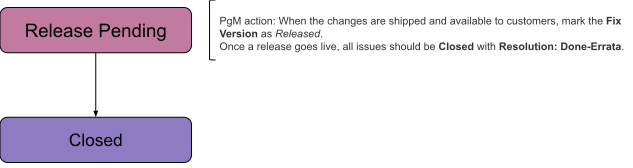
Release Pending is, effectively, a holding state indicating a proposed change is properly tested and simply awaiting release. Typically, the corresponding MR will also have the "readyForMerge" label added.
|
The proposed change is fully verified and awaiting release. |
Transitions
-
ClosedThe jira closes out once the proposed change is fully released to the general public. Note for centos-stream, this means a proposed change was merged into centos-stream and then shipped to the general public via the latest respective y-stream release. E.g. a proposed changed for centos-stream-10 was merged into centos-stream-10 and then released in the latest RHEL 10 ystream release such as 10.3 GA.
Closed
Closed indicates no further work is to occur on the documented issue as is. This can mean;
|
|
Transitions
-
None A jira is expected to stay closed once it reaches
Closedstate. If any further work is necessary (e.g. addressing an unforeseen regression caused by the accepted change, substantial conversations on the documented issue are renewed, etc), a new jira should be created or cloned (depending on what the SST’s needs are).